










Visa Indonesia “Pemeriksaan Menunggu”: Maksud, Sebab & Apa yang Perlu Dilakukan
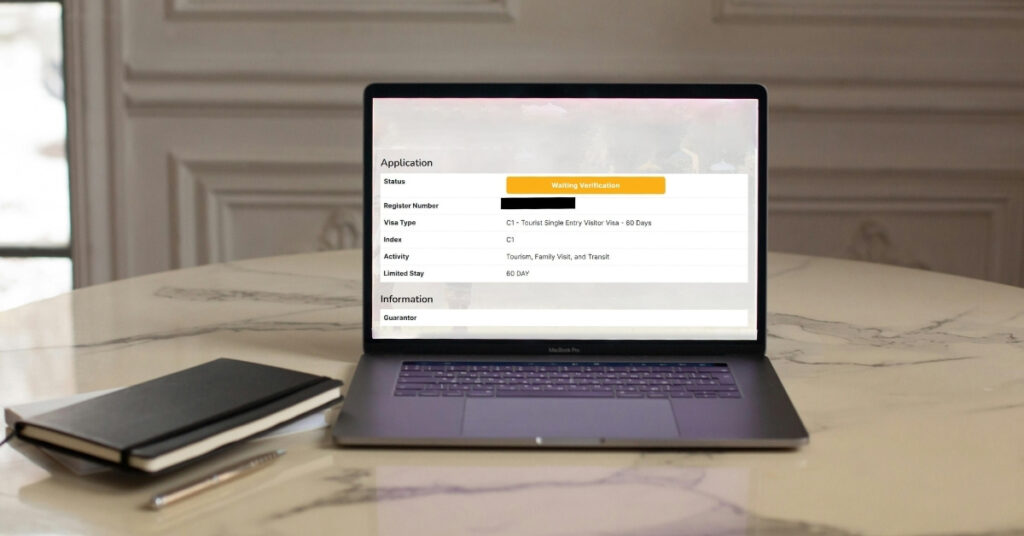
Jika status visa Indonesia anda menunjukkan “Menunggu Pengesahan,” ia bermakna Imigresen Indonesia masih meneliti permohonan anda dan belum mengeluarkan keputusan muktamad. Status itu tidak semestinya bermakna visa anda akan ditolak.
Untuk kategori visa seperti C1 dan D1, masa pemprosesan yang diterbitkan biasanya lima hari bekerja selepas pembayaran diterima. Walau bagaimanapun, permohonan mungkin mengambil masa lebih lama kerana maklumat yang hilang atau tidak konsisten, isu dokumen, pembayaran yang belum disahkan, langkah permohonan yang tidak lengkap, atau semakan tambahan.
Jika permohonan anda terperangkap pada “Menunggu Pengesahan,” panduan ini menerangkan sebab-sebab biasa, cara menyemak permohonan dan pembayaran anda, bila perlu menghubungi Imigresen, dan apa yang perlu dilakukan jika tarikh perjalanan anda semakin hampir.
Jawapan Pantas – Apa Yang Perlu Dilakukan Jika Pengesahan Tunggakan Visa Indonesia Anda Terperangkap
Perlukan jawapan sekarang? Berikut ialah senarai semak ringkas untuk anda:
- Tunggu sekurang-kurangnya 5-7 hari bekerja sebelum bimbang. Itu adalah jangka masa pemprosesan standard untuk kebanyakan jenis visa.
- Semak e-mel anda dan evisa.imigrasi.go.id akaun untuk mesej. Pihak berkuasa imigresen Indonesia mungkin meminta sesuatu.
- Jangan tempah penerbangan lagi jika anda masih menunggu. Jika visa anda diluluskan dan penerbangan sudah ditempah, anda sudah sedia.
- Hubungi imigresen secara langsung jika sudah lebih daripada lima hari bekerja tanpa sebarang perubahan
Apa Maksud Status “Pengesahan Menunggu”
“Menunggu Pengesahan” bermaksud Imigresen Indonesia masih menyemak permohonan visa anda dan belum mengeluarkan keputusan muktamad.
Semasa pengesahan, sistem memeriksa sama ada pembayaran anda telah berjaya dan sama ada dokumen anda memenuhi keperluan asas. Setelah itu, seorang pegawai imigresen akan menyemak butiran permohonan sebenar anda, maklumat pasport, tarikh perjalanan, tujuan lawatan, dan dokumen sokongan.
Pegawai membuat keputusan berdasarkan apa yang mereka lihat. Visa anda diluluskan dan dikeluarkan, atau dalam kes yang jarang berlaku, ditolak dengan penjelasan.
Dalam kebanyakan kes, permohonan e-VOA diproses dalam masa satu hari bekerja atau bahkan serta-merta. Visa C1/C2 dan jenis visa lain boleh mengambil masa 5–7 hari atau lebih. Kelewatan pemprosesan berlaku semasa musim perjalanan puncak, cuti perayaan, atau apabila sistem menghadapi ralat teknikal.
Alasan Mengapa Visa Indonesia Anda Mungkin Terperangkap pada “Menunggu Pengesahan”
“Menunggu Pengesahan” tidak mendedahkan sebab tepat mengapa permohonan anda mengambil masa lebih lama. Imigresen Indonesia tidak mendiagnosis kelewatan individu secara terbuka hanya berdasarkan status ini. Walau bagaimanapun, proses visa rasmi melibatkan pemeriksaan dokumen, pembayaran dan maklumat pemohon sebelum kelulusan. Berikut adalah perkara utama yang patut diperiksa apabila status anda tidak berubah.
Permohonan anda masih dalam masa pemprosesan biasa
Visa anda mungkin sebenarnya tidak tertangguh. Bagi kategori visa seperti Visa Pelancong C1, Imigresen menerbitkan masa pemprosesan antara lima hingga tujuh hari bekerja selepas pembayaran diterima.
Permohonan juga mungkin mengambil masa lebih lama semasa tempoh jumlah permohonan yang tinggi, terutamanya sekitar cuti utama dan musim perjalanan puncak. Imigresen Indonesia telah melaporkan peningkatan ketara dalam permohonan imigresen sekitar cuti hujung tahun dan telah memberi amaran bahawa penutupan semasa cuti boleh menyebabkan pengumpulan permohonan selepas itu.
Sebagai contoh, jika pembayaran anda direkodkan pada hari Jumaat, hari Isnin berikutnya biasanya merupakan hari bekerja seterusnya. Jika cuti awam atau tempoh yang luar biasa sibuk jatuh dalam minggu itu, permohonan anda mungkin kekal dalam “Menunggu Pengesahan” lebih lama daripada jangka masa biasa.
Contoh: Jika pembayaran anda diterima pada hari Jumaat, hari Isnin biasanya merupakan hari bekerja seterusnya. Semak tarikh pembayaran anda sebelum menganggap permohonan tersangkut.
Butiran permohonan anda mungkin tidak sepadan dengan pasport anda.
Semak bahawa maklumat yang dimasukkan dalam permohonan anda tepat sepadan dengan pasport anda, terutamanya nama penuh, nombor pasport, kewarganegaraan, tarikh lahir dan tarikh luput pasport.
Bahkan kesilapan menaip yang kecil pun patut diperiksa. Imigresen telah memberi amaran khusus bahawa kesilapan dalam maklumat pasport penting seperti nama seseorang, kewarganegaraan atau nombor pasport boleh menimbulkan masalah dengan permohonan visa elektronik.
Buka keseluruhan permohonan dan bandingkan setiap medan penting secara langsung dengan halaman biodata pasport anda.
Imbasan pasport atau foto anda mungkin sukar untuk disahkan.
Imigresen memerlukan dokumen elektronik yang jelas untuk memproses permohonan visa dalam talian. Soalan lazim rasmi visa Pada masa ini, halaman biodata pasport dan gambar pasport perlu dimuat naik dalam format JPG, JPEG atau PNG, dengan saiz fail maksimum 200 KB bagi dokumen tersebut.
Semak teks yang kabur, silau, tepi pasport yang terpotong, baris boleh dibaca mesin yang hilang atau gambar di mana wajah anda tidak jelas. Buka fail sebenar yang dimuat naik, bukan menilai hanya dari miniatur kecil pada papan pemuka.
Imigresen mungkin memerlukan pengesahan tambahan
Sesetengah permohonan mungkin memerlukan semakan tambahan kerana sejarah imigresen atau kewarganegaraan pemohon. Sebagai contoh, pemeriksaan tambahan mungkin dikenakan jika pemohon berasal dari negara yang tertakluk kepada Visa Panggilan atau keperluan kelulusan tambahan, pernah melebihi tempoh tinggal di Indonesia, atau telah diusir atau dimasukkan ke dalam senarai larangan kemasukan imigresen. Undang-undang imigresen Indonesia membenarkan mereka yang melebihi tempoh dan pelanggaran lain dikenakan pengusiran dan penangkalan (sekatan kemasukan).
Pembayaran anda mungkin tidak disahkan dengan betul.
Pengesahan pembayaran adalah sebahagian daripada prosedur rasmi pemprosesan visa oleh Imigresen. Oleh itu, bayaran yang berjaya dalam aplikasi perbankan anda hendaklah dibandingkan dengan apa yang tertera dalam permohonan visa.
Untuk masalah pembayaran eVOA, Imigresen secara khusus menasihati pemohon untuk menyemak sama ada kaedah pembayaran mereka disokong, menghubungi bank mereka jika transaksi ditolak dan menggunakan sokongan pembayaran rasmi apabila masalah berterusan.
Jika bayaran telah dikenakan tetapi aplikasi anda tidak menunjukkan status pembayaran yang betul, simpan resit, nombor transaksi dan tangkapan skrin sebelum menghubungi sokongan.
Langkah Penaja atau Penjamin mungkin masih memerlukan perhatian.
Ini hanya terpakai apabila kategori visa atau laluan permohonan melibatkan penaja atau penjamin.
Apabila orang lain atau organisasi lain menghantar permohonan melalui akaun Imigresen mereka, minta mereka memeriksa akaun tersebut juga. Notis, permintaan dokumen atau tindakan permohonan lain mungkin kelihatan di akaun yang menghantar permohonan dan bukannya terus kepada pengembara.
Masalah berkaitan penaja tidak seharusnya dianggap sebagai sebab sejagat mengapa permohonan C1 masih dalam pengesahan kerana susunan penajaan boleh berbeza mengikut laluan permohonan.
Ingat: Tiada satu pun daripada perkara ini yang mengesahkan mengapa permohonan tertentu tertangguh. “Menunggu Pengesahan” hanya memberitahu anda bahawa keputusan muktamad belum muncul. Semak rekod permohonan, dokumen sokongan, pembayaran dan e-mel terlebih dahulu, kemudian hubungi sokongan rasmi Imigresen apabila tempoh pemprosesan yang diterbitkan telah tamat.
Cara Semak dan Susul Visa Indonesia
Semak semula permohonan dan e-mel anda.
Pertama, log masuk ke Portal eVisa rasmi Indonesia Menggunakan akaun yang mengemukakan permohonan. Buka rekod permohonan lengkap dan bukannya hanya bergantung pada status ringkas yang dipaparkan pada papan pemuka.
Semak sama ada status menunjukkan “Menunggu Pengesahan,” “Menunggu Pengesahan Pegawai,” “Tunggakan,” “Dipulangkan,” atau sesuatu yang lain. Label-label ini mungkin mewakili peringkat yang berbeza, terutamanya apabila membandingkan permohonan visa baru dengan lanjutan permit tinggal.
Seterusnya, cari:
- Permintaan untuk membetulkan maklumat.
- Permintaan untuk dokumen lain.
- Notis pembayaran.
- Arahan temu janji.
- Tarikh akhir untuk menyelesaikan satu langkah lagi.
Kemudian semak alamat e-mel yang digunakan untuk permohonan. Cari dalam peti masuk, folder spam, sampah dan promosi untuk mesej yang mengandungi “eVisa,” “Immigration,” “Imigrasi,” nombor permohonan anda atau nombor pendaftaran anda.
Apabila penaja atau penjamin mengemukakan permohonan, minta mereka menyemak melalui akaun yang digunakan untuk pengemukaan.
Pastikan bayaran telah direkodkan
Buka akaun bank atau kad anda dan sahkan sama ada pembayaran telah diselesaikan. Kemudian bandingkan transaksi itu dengan status pembayaran dalam permohonan eVisa.
Bayaran yang muncul dalam akaun bank anda tidak semestinya bermakna portal eVisa telah berjaya memautkan pembayaran tersebut kepada permohonan anda.
Sediakan:
- Resit pembayaran anda.
- Nombor transaksi.
- Nombor pendaftaran atau nombor permohonan.
- Skrin tangkapan status portal.
- Skrin tangkapan yang dipotong bagi transaksi bank yang berkaitan.
Lindungi maklumat anda: Sembunyikan transaksi yang tidak berkaitan, baki akaun, nombor kad penuh dan maklumat sensitif lain.
Apabila bank menunjukkan caj yang berjaya tetapi aplikasi masih menunjukkan belum dibayar atau tidak lengkap, hubungi sokongan rasmi sebelum mencuba membayar semula.
Hubungi Sokongan Imigresen Rasmi
Setelah tempoh pemprosesan biasa tamat, gunakan saluran sokongan Imigresen rasmi.
Mulakan dengan Helpdesk atau pilihan sembang langsung yang tersedia melalui laman web eVisa rasmi atau Laman web Pengarah Jeneral Imigresen. Lokasi dan nama ciri mungkin berubah apabila portal dikemas kini.
Sebelum menghubungi sokongan, sediakan:
- Nama penuh.
- Nombor pasport.
- Kewarganegaraan.
- Jenis visa atau permit tinggal.
- Nombor pendaftaran atau nombor permohonan.
- Nombor transaksi.
- Tarikh penghantaran dan pembayaran.
- Resit pembayaran.
- Tangkapan skrin status semasa atau ralat.
- Tarikh perjalanan yang dimaksudkan.
- Keterangan ringkas tentang apa yang telah anda semak.
Pastikan mesej jelas dan berasas fakta. Tanya sama ada permohonan anda memerlukan dokumen lain, pembetulan, pengesahan pembayaran atau langkah tambahan.
Gunakan hanya saluran yang disahkan: Hanya hantar maklumat pasport dan pembayaran melalui saluran yang disahkan. imigrasi.go.id Saluran. Jangan sekali-kali menghantar kata laluan anda, butiran kad penuh, CVV atau kod keselamatan sekali guna.
Untuk permohonan yang dihantar melalui penaja Indonesia, minta penaja tersebut menghubungi Imigresen melalui akaun yang digunakan untuk penghantaran.
Kedutaan atau konsulat Indonesia mungkin dapat memberikan panduan umum, tetapi mungkin tidak dapat mengakses atau mengubah permohonan visa elektronik yang diproses melalui sistem Imigresen pusat. Hubungi misi hanya apabila laman web rasminya menyatakan ia mengendalikan kategori visa anda atau apabila permohonan telah dikemukakan melalui misi tersebut.
Ikuti prosedur yang betul untuk sambungan.
Apabila anda sudah berada di Indonesia dan memanjangkan visa atau permit tinggal, jangan anggap proses itu sama seperti permohonan visa luar negara yang baharu.
Sejak 29 Mei 2025, pemohon lanjutan, termasuk pemegang VOA yang layak, mesti mengambil gambar dan menjalani temu duga di pejabat Imigresen selepas memulakan permohonan secara dalam talian.
Semak permohonan dan e-mel anda untuk:
- Pejabat Imigresen yang ditugaskan.
- Arahan mengambil gambar dan temu bual.
- Maklumat temu janji.
- Dokumen yang mesti anda bawa.
- Tarikh akhir untuk menghadiri.
Bawa pasport asal anda dan sebarang dokumen yang khusus diminta oleh Imigresen. Adalah bijak juga untuk menyimpan salinan borang permohonan dan resit pembayaran.
Jangan melawat pejabat semata-mata dengan harapan seseorang akan mempercepat permohonan. Apabila tiada temu janji atau arahan pejabat dipaparkan, hubungi pejabat Imigresen berkaitan atau Helpdesk pegawai terlebih dahulu.
Apabila anda berada di luar Indonesia dan menunggu eVisa baru, gunakan saluran sokongan Imigresen pusat atau minta penaja yang mengemukakan permohonan untuk membuat susulan. Lawatan ke pejabat Imigresen tempatan terutamanya berkaitan dengan permohonan dan prosedur permit tinggal yang diproses di dalam Indonesia.
Apa yang perlu diperiksa sebelum menghubungi imigresen
Semakan teliti mungkin mendedahkan permintaan yang terlepas atau ketidakpadanan yang boleh dielakkan. Lakukan pemeriksaan ini mengikut urutan.
Pastikan bayaran telah direkodkan.
Bandingkan transaksi bank atau kad dengan status pembayaran dalam akaun eVisa. Simpan resit, nombor transaksi, nombor permohonan, dan tangkapan skrin status.
Kredit pada penyata anda tidak semestinya membuktikan bahawa portal telah berjaya memautkan pembayaran. Hubungi saluran rasmi sebelum membuat pembayaran sekali lagi.
Buka keseluruhan permohonan
Jangan hanya bergantung pada label papan pemuka yang ringkas. Cari:
- Permintaan untuk membetulkan maklumat.
- Permintaan untuk dokumen lain.
- Notis pembayaran.
- Mesej yang dikembalikan atau yang sedang menunggu.
- Arahan temu janji lanjutan.
- Tarikh akhir untuk menyelesaikan suatu tindakan.
Semak setiap folder e-mel
Cari dalam peti masuk, spam, sampah, promosi, dan folder yang telah dipadam. Cari “eVisa,” “Immigration,” “Imigrasi,” nombor pendaftaran anda, nombor permohonan, atau nombor transaksi.
Bandingkan borang itu dengan pasport anda.
- Nama penuh dan susunan nama.
- Nombor pasport dan kewarganegaraan.
- Tarikh dan tempat kelahiran.
- Tarikh keluaran dan luput pasport.
- Tujuan perjalanan.
- Pasport dan gambar peribadi.
- Dokumen kewangan atau perjalanan yang diperlukan.
Semak setiap fail yang dimuat naik
Buka setiap fail pada skrin bersaiz biasa dan zum masuk. Halaman pasport hendaklah memaparkan keseluruhan kawasan biodata dan baris boleh dibaca mesin tanpa silau, kabur, atau tepi yang terpotong.
FAQ rasmi kini menyenaraikan JPG, JPEG, dan PNG dengan saiz maksimum 2 Mb untuk halaman biodata pasport dan gambar pasport yang digunakan dalam permohonan visa dalam talian. Ikuti keperluan yang ditunjukkan untuk visa anda yang tepat.
Bagaimana untuk menghubungi Imigresen Indonesia mengenai kelewatan
Setelah tempoh pemprosesan biasa tamat, hantarkan laporan ringkas melalui saluran rasmi. Sertakan maklumat yang mencukupi untuk mengesan rekod tanpa menghantar data peribadi yang tidak perlu.
Gunakan Helpdesk eVisa yang telah log masuk terlebih dahulu.
Log masuk ke laman web eVisa rasmi dan gunakan Helpdesk di sudut bawah kanan.
- Nama penuh dan kewarganegaraan.
- Nombor pasport.
- Jenis visa atau permit tinggal.
- Nombor pendaftaran dan permohonan.
- Nombor transaksi.
- Tarikh penghantaran dan pembayaran.
- Resit pembayaran.
- Tangkapan skrin status atau ralat.
- Tarikh ketibaan yang dimaksudkan.
- Keterangan ringkas tentang apa yang anda periksa.
Lindungi maklumat peribadi anda
Hanya hantar pasport dan butiran permohonan melalui saluran yang disahkan. imigrasi.go.id halaman, alamat e-mel rasmi, atau Helpdesk yang dilog masuk.
- Jangan sekali-kali menghantar kata laluan eVisa anda.
- Jangan sekali-kali berkongsi nombor kad penuh atau CVV.
- Jangan pernah berkongsi kod sekali guna.
- Jangan pernah berkongsi kata laluan perbankan dalam talian.
- Menyaring baki dan transaksi yang tidak berkaitan dengan tanaman daripada bukti pembayaran.
Salin dan tampal mesej Helpdesk
Apa yang tidak boleh dilakukan semasa anda menunggu
- Jangan mengemukakan beberapa permohonan yang sama melainkan Imigresen memberitahu anda untuk memohon semula.
- Jangan bayar orang yang tidak dikenali yang mendakwa mengawal sistem imigresen.
- Jangan kongsi maklumat pasport, log masuk, kad, atau kod sekali guna melalui akaun media sosial yang tidak disahkan.
- Jangan anggap “Waiting Verification” sebagai visa yang telah dikeluarkan.
- Jangan membuat keputusan perjalanan yang tidak boleh dikembalikan hanya berdasarkan anggaran masa pemprosesan.
- Jangan anggap pilihan kemasukan pelancong lain juga terpakai kepada anda.
Bagaimana jika penerbangan anda akan berlepas tidak lama lagi?
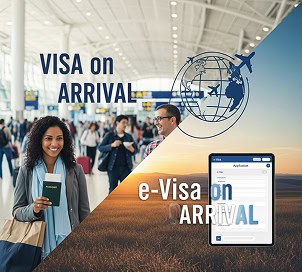
Permohonan eVisa yang sedang diproses tidak menggantikan dokumen perjalanan yang telah dikeluarkan. Sesetengah pengembara mungkin layak untuk mendapatkan Visa Setibanya, Visa elektronik pada ketibaan, kemasukan tanpa visa, atau visa pelawat lain. Yang lain mesti memiliki visa yang diluluskan sebelum melakukan perjalanan.
- Semak kelayakan menggunakan maklumat rasmi pemilihan visa Indonesia.
- Pastikan aktiviti yang dirancang dibenarkan di bawah pilihan alternatif.
- Semak tempoh sah pasport dan keperluan tiket sambungan.
- Jangan anggap nasihat yang diberikan kepada pelancong lain sesuai untuk anda.
- Hubungi syarikat penerbangan apabila anda perlu mengesahkan dokumen daftar masuk.
Terokai pilihan kemasukan yang tersedia pada Halaman pilihan visa Visa-Indonesia.
Penjelasan Status eVisa Indonesia yang Lazim
Ungkapan boleh berbeza mengikut jenis aplikasi. Keterangan ini adalah panduan umum dan bukannya definisi rasmi bagi setiap status dalaman.
Terima Visa Indonesia baru anda pada tarikh perkhidmatan yang dijanjikan
Visa yang tertangguh boleh mengganggu penerbangan, penginapan, dan baki rancangan perjalanan anda. Apabila anda mengemukakan permohonan baharu yang layak melalui Visa-Indonesia, kami akan mengesahkan tarikh perkhidmatan yang dijanjikan sebelum penghantaran dan menguruskan proses mengikut jadual tersebut.
Mohon visa Indonesia andaPenting: Perkhidmatan ini terpakai untuk permohonan visa baharu yang layak dikemukakan melalui Visa-Indonesia. Jangka masa bermula selepas dokumen lengkap dan pembayaran yang betul diterima. Kelulusan muktamad kekal di bawah Imigresen Indonesia. Visa-Indonesia tidak dapat mengambil alih permohonan yang dikemukakan melalui akaun atau penyedia lain.
Soalan Lazim
Adakah “Waiting Verification” bermakna visa saya akan ditolak?
Tidak. Ia bermaksud sistem belum memaparkan keputusan akhir. Ia tidak mengesahkan sama ada kelulusan atau penolakan. Teruskan memeriksa akaun dan e-mel anda, kemudian hubungi sokongan rasmi selepas tempoh biasa.
Berapa lama pengesahan visa Indonesia mengambil masa?
Beberapa halaman kategori visa rasmi, termasuk C1 dan D1, menerbitkan masa pemprosesan selama lima hari bekerja selepas pembayaran diterima. Ia mungkin mengambil masa lebih lama apabila maklumat hilang, satu langkah lain tidak lengkap, atau semakan lanjut diperlukan.
Adakah hujung minggu dikira sebagai hari bekerja?
Tidak. Hari Sabtu dan Ahad bukan hari bekerja. Cuti awam Indonesia juga boleh memanjangkan tempoh menunggu kalendar.
Bagaimana saya boleh mencari nombor pendaftaran saya?
Nombor pendaftaran akan muncul di sebelah nama pemohon dalam akaun eVisa setelah borang permohonan diisi.
Apa yang perlu saya lakukan selepas lima hari bekerja?
Semak papan pemuka penuh, status pembayaran, e-mel berdaftar, folder spam, butiran pasport, dan fail yang dimuat naik. Apabila tiada permintaan atau masalah jelas muncul, sediakan maklumat anda dan gunakan Helpdesk Imigresen yang telah log masuk.
Bolehkah saya melakukan perjalanan semasa status menunjukkan “Menunggu Pengesahan”?
Permohonan yang sedang diproses bukanlah visa yang telah dikeluarkan. Anda hanya boleh melakukan perjalanan apabila anda mempunyai kebenaran masuk yang sah atau layak untuk kemudahan kemasukan lain yang sah.
Patutkah saya membatalkan permohonan dan memohon semula?
Jangan secara automatik mengemukakan permohonan lain. Tanya Imigresen sama ada anda perlu membetulkan, meneruskan, atau menggantikan rekod sedia ada. Memohon semula tanpa panduan boleh menimbulkan yuran tambahan dan rekod berganda.
Bagaimana jika kad saya telah dikenakan bayaran tetapi akaun tidak dikemas kini?
Simpan resit, nombor transaksi, nombor pendaftaran, butiran pasport, dan tangkapan skrin. Kemudian hubungi saluran sokongan pembayaran rasmi atau Helpdesk sebelum membuat pembayaran lain.
Adakah “Menunggu Pengesahan Pegawai” status yang sama?
Tidak semestinya. Ia mungkin tergolong dalam peringkat atau aliran kerja yang berbeza, terutamanya sebagai sambungan. Buka butiran aplikasi dan ikuti arahan yang dilampirkan pada rekod tersebut.
Bolehkah ejen visa menjamin kelulusan yang lebih cepat?
Tiada ejen swasta yang mengawal keputusan akhir Imigresen. Penyedia yang sah boleh menjanjikan jangka masa perkhidmatan sendiri, semakan dokumen, komunikasi, atau remedi, tetapi tidak seharusnya mendakwa dapat mengawal kelulusan kerajaan.
Sedia untuk memohon atau melanjutkan visa anda?
Biarkan pakar visa kami mengendalikan permohonan anda.





 English
  Bahasa Indonesia
  Español
  Italiano
  Français
  日本語
日本語  Nederlands
  繁體中文
繁體中文  한국어
한국어  Norsk bokmål
  Svenska
  Dansk
Dansk  Türkçe
  Polski
  香港中文
香港中文  简体中文
简体中文  Українська
  Русский
  Bahasa Melayu