









How to Create QRIS for Merchant in Indonesia (2026 Guide)

Lots of customers love how easy it is to pay with Indonesia’s QRIS. But some merchants get stuck on the same questions:
- Do I need to “make” a QR code myself?
- Which provider should I choose?
- What documents do they want?
- What fees are allowed, and what fees are not allowed?
This article is an introduction to how to create QRIS for businesses in Indonesia, explaining the basics and practical steps to get started. QRIS allows even small vendors, like warungs, to provide cashless payment options without needing expensive equipment like EFTPOS machines.
Let’s make it simple. This guide walks you from zero to “QRIS ready” in a clean, official way, so your QR code works across many apps, your merchant name shows correctly, and your customers feel safe paying you.
QRIS in plain words
Before you start, it’s important to understand QRIS, its purpose, and how it benefits both merchants and customers.
QRIS (Quick Response Code Indonesian Standard) is Indonesia’s national QR payment standard, designed to enable seamless cashless payments across the country. The big idea is easy: one QR code can accept payments from many different apps and banks.
Popular digital wallets like DANA, OVO, and GoPay support QRIS payments, making it easy for customers to shop using electronic money. These applications (e-wallets and mobile banking apps) play a crucial role in facilitating QRIS transactions, ensuring quick, secure, and convenient payments for both online and physical stores.
That means you don’t need five different QR stickers at your cashier. You can use one QRIS code and accept payments from lots of customers, even if they use different apps.
Before you register: pick the setup that fits your business
There are different options and methods for implementing QRIS payments, such as using static or dynamic QR codes and various integration options like API integrations or payment links.
You can start QRIS even if your business is small. But you’ll save time if you decide these basics first.
1) Static QR vs dynamic QR
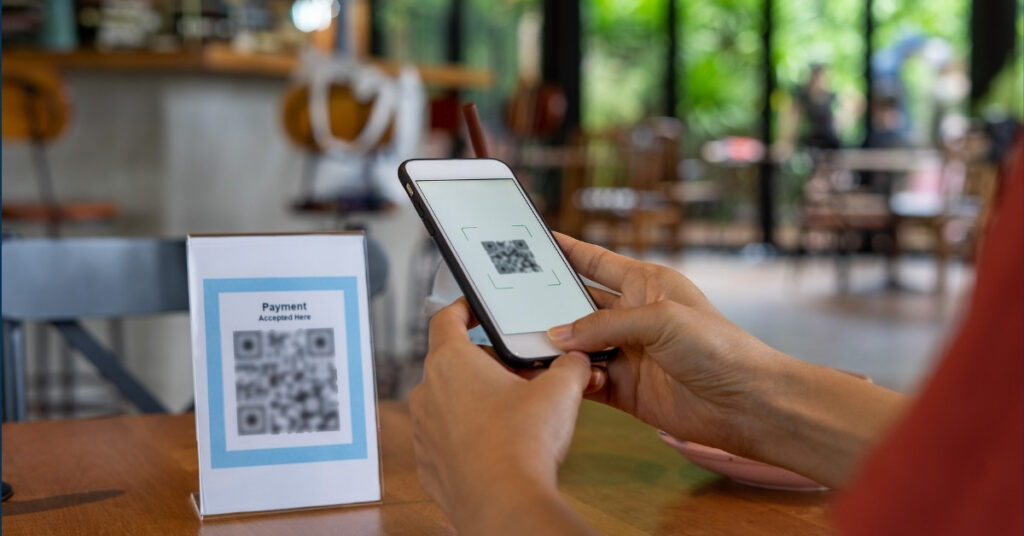
Most providers offer two common formats:
Static QRIS: A static QRIS code is a fixed, unchanging QR code that represents the merchant’s general payment information. It does not change for each transaction and is ideal for merchants who want to accept cashless payments without generating a new QR code every time. After activation, merchants can view and print their static QRIS image to display at their physical store.
Customers scan the static QRIS and must manually input the transaction amount themselves, making it suitable for warungs, stalls, small stores, and home businesses. It’s simple to print and display, but merchants should remind customers to input the correct amount.

Dynamic QRIS: A dynamic QRIS code is generated uniquely for each transaction and can include transaction-specific details such as the amount and order information. This provides greater flexibility for different payment scenarios by including variable information that changes for each transaction. D
Dynamic QRIS codes are commonly used in situations like online shopping carts or invoice payments where transaction details need to be specified dynamically. They are great for stores with lots of daily transactions or cafés with a POS system, as the amount is already inside the code, making checkout faster. Dynamic QRIS often requires an app or POS integration.
If you’re just starting, static QRIS is often the easiest path.
2) Where do you want the money to land?
Think about your settlement account. In plain terms: when customers pay you, where should the money go?
Some providers settle into a bank account. Some settle on a wallet balance. Some can do both. You’ll choose this during onboarding.
It’s important to choose settlement options and payment systems that support QRIS to ensure smooth and interoperable transactions. Mobile banking is a key component of the payment infrastructure, allowing you to manage QRIS payments, receive settlements, and handle cashless transactions easily and securely through your smartphone.
3) Know your merchant category (because it affects fees)
QRIS uses a fee system called MDR (Merchant Discount Rate). The rate can change based on your merchant category and transaction size. Don’t panic, we’ll explain it clearly in a minute.
If you operate multiple brands or business entities, each brand or merchant can have its own subaccount under QRIS, allowing you to manage payment data and transactions separately across different brands.
For now, just remember: your category matters.
Step-by-step: how to register QRIS for your business (official route)

The registration process of creating a QRIS for merchants includes filling out a registration form and making a QRIS payment. After completing the registration steps, you will need to activate your QRIS to start accepting payments.
Step 1: Choose a licensed QRIS provider (PJP)
Start by choosing a PJP that is licensed to provide QRIS services. PJPs can include banks and non-bank payment companies.
Start by choosing a PJP (Payment System Service Provider) that is licensed to provide QRIS services. PJPs can include banks, such as BCA, Mandiri, BNI, and Bank Mega, and non-bank payment companies/e-wallets, like Gopay, OVO, and DANA.
Tip: Don’t just choose the first offer you see on social media. Check whether the provider is listed as licensed for QRIS.
Note: Always verify the provider’s license status through the official regulator or QRIS website before proceeding with registration. This ensures you are dealing with an authorized and legitimate PJP.
Step 2: Register with that provider (online or in-person)
Many PJPs let you register online. Some also offer branch registration. If your provider has an online form, it can be very quick.
Many PJPs let you register online, and some also offer in-person registration through branch registration, so getting started can be pretty quick. In most cases, you’ll fill out a registration form on the QRIS website (or inside the provider’s merchant app), then upload the documents that match your selected business type options. The system will log your registration and document submission, and it will tell you whether your information is complete and correct, or if something is missing.
For example, if you choose BCA, you can download the Merchant BCA app on the PlayStore or AppStore and sign up there. If you don’t have a BCA EDC, choose Statis QRIS.
Or, if you prefer QRIS from an eWallet service like GoPay, download GoPay Merchant and fill out your personal and business details. Either way, your PJP will guide you through the application and explain the exact requirements.
Step 3: Submit your business details and documents
Every PJP can set slightly different requirements. But most will ask for the basics so they can verify you are a real merchant. You must ensure all required documents are submitted clearly and completely to avoid delays in the process.
Documents commonly requested (your provider may ask for more or less):
- A valid ID (for Indonesians, this is typically KTP)
- Your business name and business address
- A phone number and email you actively use
- A bank account number or wallet account (for settlement)
- A photo of your business location or your selling setup (especially for small merchants)
- Optional but sometimes requested: NPWP, business license/permit, or a simple business statement letter
- For corporate entities: deed of establishment, Taxpayer ID (NPWP), and a corporate bank account
To register for QRIS, your business must first be registered as a merchant and obtain a National Merchant ID (NMID). NMID registration typically takes about 3–4 working days. QRIS activation usually takes 1–2 working days after all required documents have been submitted and verified.
Pro tip: Use clear photos and consistent spelling. Small differences (like one letter missing) can slow verification.
Step 4: Verification → Merchant ID → QRIS issued
After your documents are verified, the PJP creates your Merchant ID and issues your QRIS code.
You will receive notifications regarding your registration status via email and WhatsApp, including your username and password. Once your registration is processed, you need to activate your QRIS to start accepting payments.
You can view and download your static QRIS image from the provider’s dashboard, often by clicking the ‘See Details’ button on the Service page. After registration is complete, you can monitor your transactions through the QRIS dashboard.
This is the moment you’ve been waiting for. Your QRIS code is now tied to your merchant profile.
Step 5: Display your QRIS and do a test payment
Before you celebrate, do one tiny test.
- Print your QRIS clearly and display it prominently at the point of sale (such as your store counter or checkout stand) to make it easy for customers to scan and pay.
- Ask a friend to scan it.
- Try a small payment (even Rp1.000 is fine)
- Check if your merchant name appears correctly
- Confirm the money lands in the right place
Implementing QRIS sales options at the point of sale streamlines payment acceptance, making it convenient for both businesses and customers. Remember, QRIS adoption is mandatory for payment providers under Bank Indonesia’s regulations.
If anything looks weird, wrong name, wrong address, or payment not received, contact your PJP right away.
Merchant Discount Rate (MDR)
MDR is a fee charged to the merchant for QRIS transactions. It’s not a “customer fee.” It’s a merchant service fee.
QRIS helps streamline payment acceptance and daily reconciliation, benefiting merchants with faster and more organized transactions.
Here’s the key rule you should remember:
MDR is paid by the merchant and should not be charged as an extra fee to the customer.
So if you see a shop adding “Admin QRIS Rp1.000” on top of the bill, that’s not the right way to do it.
The current MDR rates you should know
These are the headline numbers most merchants care about:
Regular merchants
- Micro merchants (Usaha Mikro / UMI):
- Transaction ≤ Rp500.000: 0%
- Transaction > Rp500.000: 0.3%
- Small, medium, and large merchants (UKE/UME/UBE): 0.7%
Special categories
- Education: 0.6%
- Gas stations (SPBU): 0.4%
- Some public service and social donation categories: 0%
If you’re a micro merchant and most of your transactions are under Rp500.000, this can be a big win.
“But I still need to cover costs, what should I do?”
Totally fair question. Businesses need to survive.
The clean approach is not to add a surprise QRIS “admin fee” at checkout. Instead, you can:
- Adjust prices slightly (in a transparent way)
- Offer the same price, but run promos for cashless days
- Use QRIS to reduce other costs (less cash handling, fewer change issues)
And if a customer asks about fees, keep it simple: “QRIS fees are on the merchant side, not the customer side.”
Common problems (and how to fix them fast)
Problem 1: My merchant name shows wrong
This is usually a data issue. Ask your PJP to update your merchant profile. Use the exact name you want customers to see.
Problem 2: I got classified wrong (micro vs non-micro)
Because MDR can depend on merchant category, classification matters. If you believe your category is wrong, ask your PJP to review it.
Problem 3: QR code won’t scan
Most scan issues come from printing and placement.
- Print the QR in high quality
- Keep it flat, not wrinkled
- Don’t put it behind shiny plastic that reflects light
- Keep it near the cashier, well-lit
Problem 4: Someone offers to “replace” my QRIS
Be careful. Your QRIS is tied to your Merchant ID. If someone swaps your code, payments can go to the wrong place.
Rule of thumb: only accept QR updates through your official provider channel.
Your first-day QRIS checklist

Once your QRIS is active, do these five things.
- Do a small test payment
- Confirm your merchant name looks correct
- Confirm where the settlement goes (bank/wallet)
- Train staff on the simple script:
- “Scan the QR, enter the amount, then show me the success screen.”
- Decide your refund rule
Mistakes happen. Know who to contact and how to handle refunds.
Quick FAQs
Do I need a business license to get QRIS?
It depends on the provider and your merchant type. Many providers can onboard micro merchants with basic proof of business activity. Your PJP will tell you what they require.
How long does it take?
It depends on how fast verification goes. If your documents are clear and complete, onboarding can be quick.
Can I use one QRIS for multiple branches?
Some businesses set up a separate QRIS per outlet so each location has its own tracking and settlement. Ask your provider what’s best for your structure.
What if I’m confused or stuck?
Start with your PJP support. If you still need help, Bank Indonesia has an official contact center (131) for public information.
What is the per-transaction limit for QRIS payments?
The per-transaction limit for QRIS payments is capped at Rp10 million.
How do APIs and webhooks help online stores with QRIS?
For online stores, using well-documented APIs and configuring webhooks is essential to ensure real-time payment updates and seamless integration with your e-commerce platform.
What are the best practices for QRIS setup?
Best practices include choosing the right integration type (static, dynamic, or API-based), focusing on security measures, and ensuring your system is regularly updated.
What is the future reach of QRIS?
By 2026, the QRIS system setup will allow access to over 60 million users and is projected to support 17 billion transactions.
Are there requirements for activating QRIS?
QRIS can only be activated if your business operates in Indonesia, and your account type must be ‘Corporate’.
How do e-wallets, payment links, and APIs work with QRIS?
E-wallets like Gopay, OVO, and DANA are essential for making and receiving QRIS payments, enabling cashless transactions. You can generate a payment link for customers, allowing them to pay via QRIS by clicking the link and scanning the QR code. APIs are used for integration, letting developers automate QRIS code generation and payment processing.
Final thought
Getting QRIS is not about being “fancy.” It’s about being ready for how people pay today.
If you do it the official way, pick a licensed provider, submit clean documents, verify your Merchant ID, and then test your setup, you’ll have a QRIS that works smoothly and looks trustworthy.
And next time someone asks, “Bisa QRIS?” you can smile and say, “Bisa.”
Ready to Apply or Extend Your Visa?
Let our visa specialists handle your application.





 English
  Bahasa Indonesia
  Español
  Italiano
  Français
  日本語
日本語  Nederlands
  繁體中文
繁體中文  한국어
한국어  Norsk bokmål
  Svenska
  Dansk
Dansk  Türkçe
  Polski
  香港中文
香港中文  简体中文
简体中文  Українська
  Русский
  Bahasa Melayu